Bitlocker Recovery Key Process
Bitlocker Recovery Process
A BitLocker recovery key is needed when BitLocker can’t automatically unlock an encrypted drive in Windows. This key, which is a 48-digit number, is used to regain access to the drive.
You might be prompted for the BitLocker recovery key during startup, due to a security risk or hardware change. You might need to provide a BitLocker recovery key for data or external drives, for example if you forgot the unlock password:
Different Options
There are several places where your recovery key might be, depending on the choice that was made when activating BitLocker.

Included also is a video guide at the bottom of the page.
Personal Email
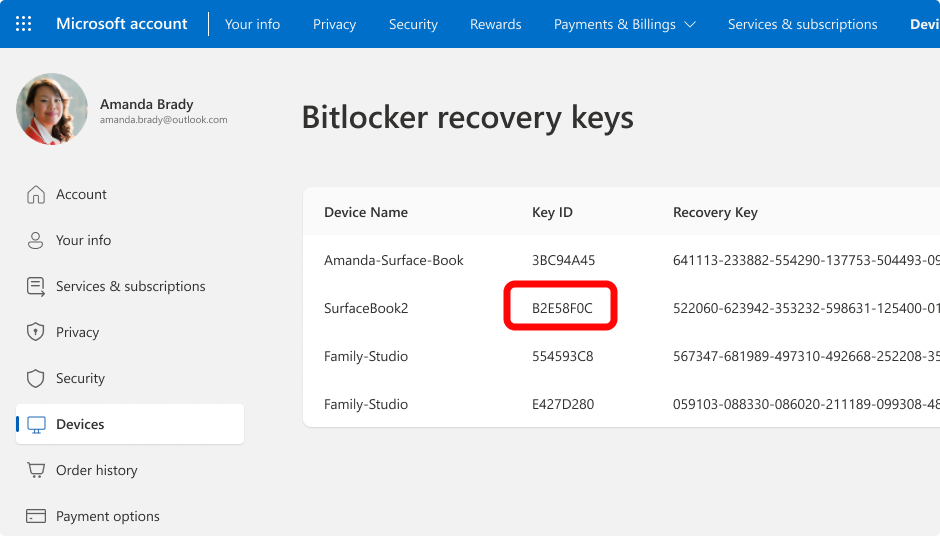
From another device, open a web browser and go to https://aka.ms/myrecoverykey
Sign in with your Microsoft account and locate the key ID:
Use the related recovery key to unlock the drive
Work Email
If your device was ever signed into an organization using a work or school account, the recovery key could be stored in that organization's account.
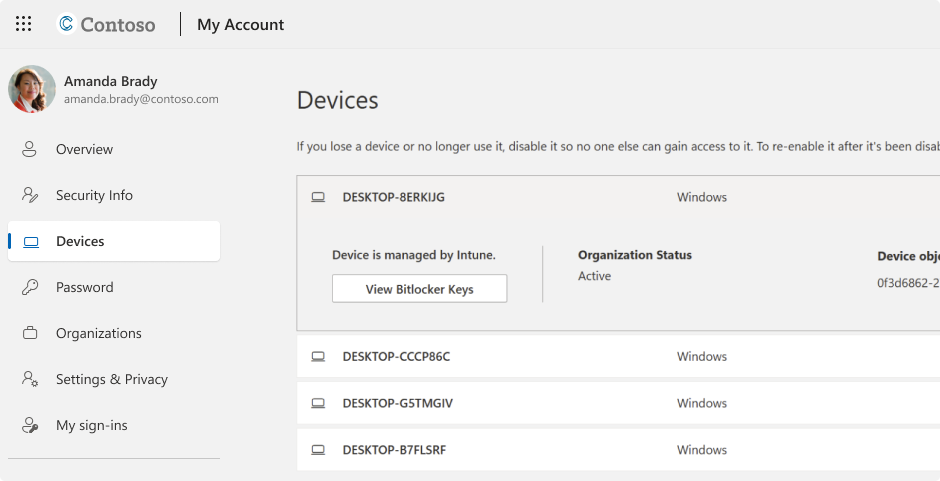
From another device, open a web browser and go to https://aka.ms/aadrecoverykey
Sign in with your work or school account
Select Devices and expand the device for which you need to retrieve the recovery key
Select the option View BitLocker Keys
Using the key ID, find the related recovery key and use it to unlock the drive
Contact support:
If Ghost Systems manages your Office 365 products. Do contact us via our normal support channels, or submit a ticket via the Ghost icon. Reference this article so we know what has been attempted already.
Additional resources:
Related Articles
Back Up Your BitLocker Recovery Key
Back Up Your BitLocker Recovery Key A BitLocker recovery key is needed when BitLocker can’t automatically unlock an encrypted drive in Windows. This key, which is a 48-digit number, is used to regain access to the drive. You might be prompted for the ...